Polly Widget
Design a poll widget that can be easily embedded on websites, such as articles and blogs to allow website viewers to vote on options.
Question
Design a poll widget that can be easily embedded on websites, such as articles and blogs to allow website viewers to vote on options.
Requirements
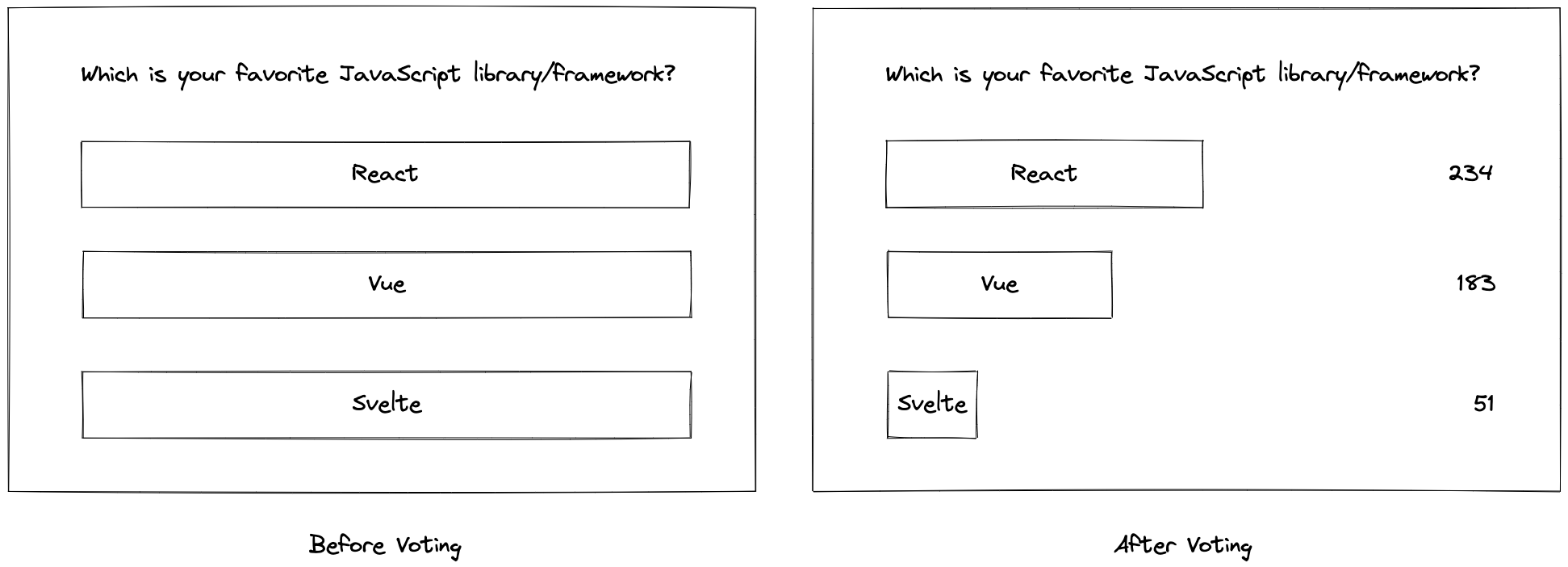
- The widget displays the following information:
- list of options for users to vote on.
- The latest number of votes for each option. This is only shown after the user has submitted a vote.
- The following back end APIs are provided:
- Fetching of the poll results.
- Record a new vote on an existing poll option.
- Remove a vote from an existing poll option.
- It should not require much effort for a website owner to embed a poll widget within their websites.
Requirements exploration
These are questions you should be asking your interviewer to dive deeper into the problem and refine the requirements.
Q1. What are the most critical aspects of the component?
- Ease of embedding the polling widget within websites.
- User experience as a voter.
Q2. Does the widget show details of people (e.g. thumbnail) who voted for an option?
- Whether we show that level of detail will affect the data model and APIs. We assume a basic version where we just have to show the count.
Q3. Can a user vote on multiple options?
Yes, a user can vote on multiple options.
Q4. How do we determine the length/proportion of each option bar to render?
You are free to decide that.
Q5. In what order should the options be shown? By popularity/user has voted/random?
Popularity.
Q6. How are the options determined? Can users add more options?
The poll is created by the website owner in a separate admin portal and the options are determined during poll creation and cannot be modified after that.
Q7. Is there a maximum number of options shown in the widget?
Maximum number of options is 6.
Q8. Must users be logged in on the page in order to vote?
Anyone can vote regardless of whether they are logged in or out. Votes should be persisted for the same user.
The key focus areas typically include:
- Requirement Understanding:
- Whether you can clearly describe and understand the core requirements of the poll widget, such as real-time updates, data consistency, and handling high traffic. System Design Capability:
- How you design the overall architecture, including data storage, user request handling, and vote calculation.
- Whether you consider scalability and high availability, such as handling high traffic through horizontal scaling or reducing database load with caching. Technology Choices and Justifications:
- Which technologies you choose to implement real-time updates (e.g., WebSockets or Server-Sent Events) and the pros and cons of these choices.
- How you ensure data consistency and avoid race conditions, especially in high concurrency scenarios. Performance and Scalability:
- How you design the system to handle a large number of simultaneous votes, ensuring low latency and high responsiveness.
- Whether you consider the system’s ability to scale smoothly as the user base grows and to expand quickly. Failure Handling and Fault Tolerance:
- How you plan to handle potential system failures, such as database crashes or network delays.
- Whether your system design includes robust fault tolerance and automatic recovery mechanisms.
On This Page
- Question
- Requirements exploration
- Q1. What are the most critical aspects of the component?
- Q2. Does the widget show details of people (e.g. thumbnail) who voted for an option?
- Q3. Can a user vote on multiple options?
- Q4. How do we determine the length/proportion of each option bar to render?
- Q5. In what order should the options be shown? By popularity/user has voted/random?
- Q6. How are the options determined? Can users add more options?
- Q7. Is there a maximum number of options shown in the widget?
- Q8. Must users be logged in on the page in order to vote?
- The key focus areas typically include: