From 60 to 100: How I Optimized My Astro Portfolio to Perfect Lighthouse Scores

From 60 to 100: How I Optimized My Astro Portfolio to Perfect Lighthouse Scores
As a frontend engineer, your portfolio website is your resume in action. When my Lighthouse performance score on mobile sat at around 60 — orange, mediocre, embarrassing — I knew I had to fix it. After a systematic optimization effort, I achieved 96 on Mobile and 100 on Desktop, with FCP dropping from 2.9s to 0.2s.
Here’s exactly what I diagnosed, analyzed, and fixed.
The Starting Point: What Was Wrong?
Lighthouse flagged three major bottlenecks on my Astro + React Islands site:
Bottleneck 1: Render-Blocking Google Fonts (750ms delay)
The site loaded fonts from Google’s CDN using a synchronous <link> tag. This created a three-hop cross-origin request chain:
HTML → fonts.googleapis.com (CSS) → fonts.gstatic.com (woff2) → render
Just the CSS file alone took 750ms. The 28 font files (covering multiple language subsets) added another ~300ms. This single resource accounted for nearly 1 second of render-blocking time.
Bottleneck 2: JavaScript-Dependent Hero (465KB+ before first paint)
The Hero section — the largest above-the-fold element and the LCP element — was implemented as a React Island with client:load. This meant the browser had to download and execute the entire JS dependency chain before showing any Hero content:
Islands.js (45KB) → react-dom (373KB) → LanguageContext (47KB) → Hero render
On a 4G connection, this chain took over 2.5 seconds. The user stared at a blank screen waiting for JavaScript to render what was essentially static text.
Bottleneck 3: Barrel File Destroying Code Splitting
All 11 React components were exported through a single Islands.tsx barrel file:
export const Navbar = withIsland(NavbarComp);
export const Hero = withIsland(HeroComp);
export const Services = withIsland(ServicesComp);
// ... 11 components total
Vite bundled them into a single 45KB shared chunk. Even if a page only needed the Navbar, it downloaded code for all 11 components.
The Optimizations
1. Self-Hosted Fonts (Eliminated Cross-Origin Delay)
Problem: Google Fonts CDN = 750ms render-blocking + 300ms font download.
Solution: Replaced the CDN link with @fontsource packages for self-hosting, and kept only the latin subset.
- <link href="https://fonts.googleapis.com/css2?family=Outfit..." rel="stylesheet" />
+ import '@fontsource/outfit/latin-400.css';
+ import '@fontsource/outfit/latin-700.css';
Result: 28 font files → 8 files. Zero cross-origin requests. The fonts now load from the same domain as the HTML, eliminating DNS lookups, TCP connections, and TLS handshakes entirely.
2. Static Hero Rendering (The Biggest Win ⭐)
Problem: Hero required 465KB+ of JS to render static text.
Solution: Converted the Hero from a React Island (client:load) to a pure Astro component (.astro). Since Hero has no interactivity — no state, no click handlers — it’s purely presentational content that belongs in static HTML.
- <Hero client:load />           <!-- Needs 465KB JS -->
+ <HeroStatic />                 <!-- Zero JS, direct HTML -->
The tricky part was i18n. The React Hero used useLanguage() for translations. For the static version, I embedded all translations using data-i18n attributes and added a tiny inline script (<1KB) that listens for a language-changed custom event from the Navbar Island:
<h1>
  <span data-i18n="hero.title1" data-i18n-en="Senior Frontend Engineer"
        data-i18n-zh="資深前端工程師" data-i18n-de="Senior Frontend-Entwickler">
    Senior Frontend Engineer
  </span>
</h1>
Result: Hero HTML appears in the initial server response. FCP no longer depends on JavaScript at all.
3. Islands Code Splitting (Individual Entry Points)
Problem: Barrel file creates one shared chunk for all components.
Solution: Created individual island wrapper files, each importing only its own component:
- import { Navbar, Services, ... } from "@/components/Islands";
+ import NavbarIsland from '@/components/islands/NavbarIsland';
+ import ServicesIsland from '@/components/islands/ServicesIsland';
Each file is now an independent Vite entry point, enabling proper tree-shaking and parallel loading.
Result: The 45KB shared Islands.js chunk was eliminated entirely.
4. CSS Code-Splitting (Blog Styles Extraction)
Problem: A single 90KB CSS file containing blog .prose styles that the homepage never uses.
Solution: Extracted ~300 lines of .prose styles into a separate prose.css file, imported only in blog layouts.
  /* globals.css — removed ~300 lines of prose styles */
- .prose pre { ... } .prose h1 { ... } ...
+ /* Moved to src/styles/prose.css */
Result: Homepage CSS reduced from 90KB to 86KB. Blog styles load only on blog pages.
5. Critical CSS Inlining (Eliminating White Flash)
Problem: First paint showed a white screen until CSS loaded.
Solution: Three changes to BaseLayout.astro:
A. Critical theme script — Runs synchronously in <head> before any rendering:
(function() {
  var t = localStorage.getItem('theme');
  var d = window.matchMedia('(prefers-color-scheme: dark)').matches;
  if (t === 'dark' || (!t && d))
    document.documentElement.classList.add('dark');
})();
B. Inline critical CSS — CSS variables and background colors available immediately:
:root { --bg-critical: #fff7ed; }
.dark { --bg-critical: #0c0a09; }
html, body { background-color: var(--bg-critical) !important; }
C. Theme-color meta tags — Mobile browser UI matches the theme:
<meta name="theme-color" content="#fff7ed" media="(prefers-color-scheme: light)" />
<meta name="theme-color" content="#0c0a09" media="(prefers-color-scheme: dark)" />
Result: First paint now shows the correct background color (warm cream or dark) instantly, with no white flash.
The Results
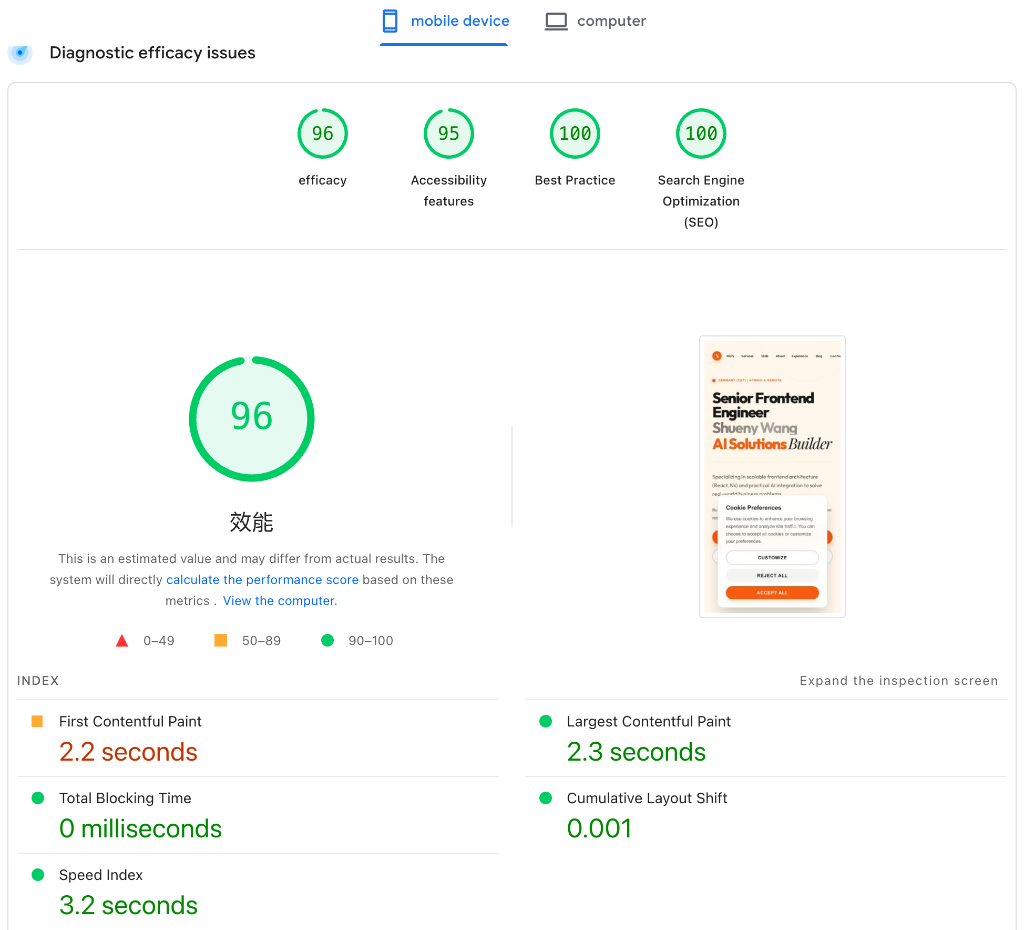
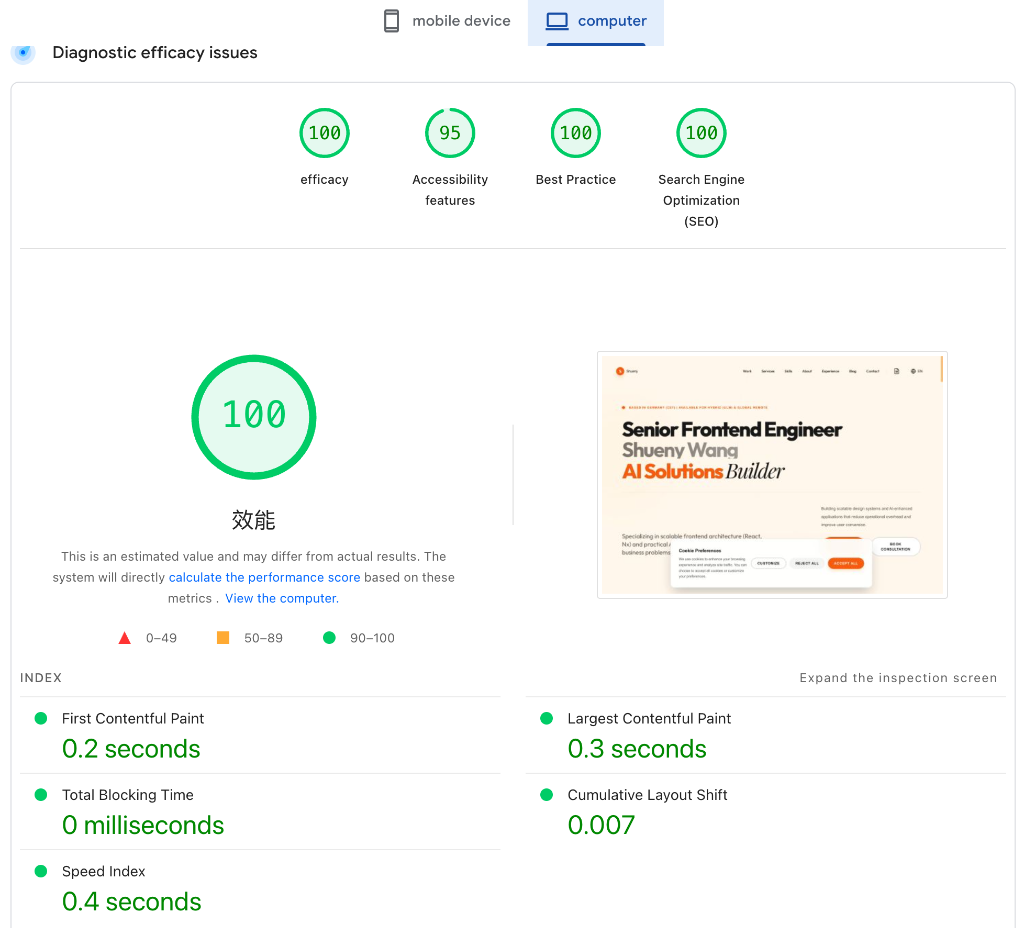
| Metric | Before | After (Mobile) | After (Desktop) | Improvement |
|---|---|---|---|---|
| Score | ~60 🔴 | 96 🟢 | 100 🟢 | +40 |
| FCP | 2.9s | 2.2s | 0.2s | 14.5× (Desktop) |
| LCP | 3.2s | 2.3s | 0.3s | 10.7× (Desktop) |
| Speed Index | 2.9s | 3.2s | 0.4s | 7.3× (Desktop) |
| TBT | 0ms | 0ms | 0ms | — |
| CLS | — | 0.001 | 0.007 | — |
Resource Changes
| Resource | Before | After | Change |
|---|---|---|---|
| Font files | 28 (CDN) | 8 (self-hosted) | -71% |
| Hero JS dependency | 465KB+ | 0KB | -100% |
| Islands shared chunk | 45KB | Eliminated | -100% |
| Homepage CSS | 90KB | 86KB | -4.4% |
| Render-blocking resources | 2 | 1 | -50% |
Key Takeaways
-
Your Hero is your LCP — don’t gate it behind JavaScript. If the content is presentational, render it as static HTML. This single change had more impact than everything else combined.
-
Barrel files are the enemy of code splitting. A single
export *file defeats Vite’s tree-shaking. Give each island its own entry point. -
Self-hosted fonts >> CDN. Eliminating cross-origin hops matters more than compressing file sizes. Three DNS/TCP/TLS roundtrips add up fast on mobile.
-
Inline your critical CSS. The browser doesn’t need to download a CSS file to know the background color. Put it in
<head>and the first paint is instant. -
Astro Islands are powerful — but only if you use them correctly.
client:loadshould be reserved for components that truly need JavaScript on first paint. Everything else should beclient:visible,client:idle, or simply static.
Performance optimization is not about doing one big thing — it’s about eliminating every unnecessary step between the server response and the user seeing content. Each optimization in this article removed one link from that chain.